Green Park and River 3D: A Natural Scene for Creators
If you work with 3D environments, you know how much time goes into building a natural-looking outdoor space from scratch. Trees, water, terrain, lighting — every element demands attention. That is where Green Park and River 3D comes in. It is a ready-to-use digital scene that provides a detailed park and river setting, designed for rendering, animation, game development, or visualization. Instead of modeling trees or tweaking river flow from zero, you get a complete environment that you can place into your project right away. This article explains what Green Park and River 3D is, why it draws interest from different types of users, and how you can put it to work in realistic ways.
What Green Park and River 3D Offers
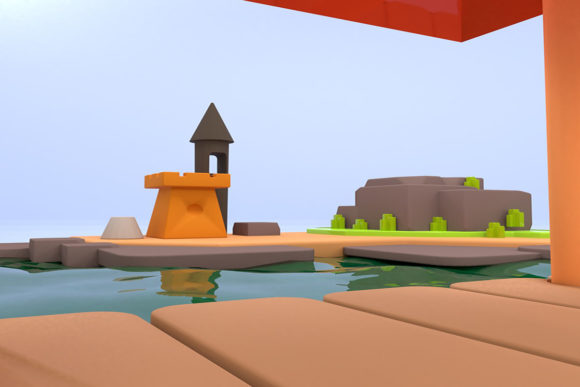
At its core, Green Park and River 3D is a pre-built 3D scene featuring a park landscape with a river running through it. The scene typically includes terrain, vegetation, water textures, and lighting that mimics an outdoor daytime setting. Depending on the version or file format you obtain, you may also get adjustable elements such as tree placement, water transparency, or sky settings. The key benefit is convenience. Instead of assembling each component, you receive a cohesive environment that looks believable from multiple angles.
The appeal lies in its versatility. Game designers use it as a backdrop for open-world levels. Architects drop it into walkthroughs to show how a building would sit beside a natural area. Educators bring it into virtual classrooms to demonstrate ecosystems or water flow. And hobbyists use it for personal renders or portfolio pieces. Because the scene is already built, you can focus on your specific task — character animation, product visualization, or storyboarding — without getting lost in environmental modeling.
Why People Turn to This Type of Scene
Many users need a realistic outdoor setting but lack the time or skill to construct every tree and rock formation. Beginners often feel overwhelmed by terrain sculpting and water shading. A pre-made scene like Green Park and River 3D removes those barriers. You do not need to be a 3D modeling expert to have a credible park environment in your project. For professionals, it is a matter of efficiency. If you are a freelance illustrator rendering a client’s concept art, spending hours on background vegetation is not a wise use of resources. A ready scene lets you redirect effort to the main subject, which is often where the value lies.
Another common need is consistency. In a series of renders or a short animation, you want the environment to stay the same across frames or scenes. Green Park and River 3D provides that stability. Because it is a single scene file, the lighting and foliage remain uniform. You do not have to worry about mismatched grass shades or water that looks different between shots.
Practical Uses Across Contexts
Green Park and River 3D fits into many personal, creative, and professional workflows. Below are realistic examples of how different people use it.
Creative Portfolio and Personal Projects
A 3D artist building a portfolio might use the scene to showcase character models. Placing an animated figure beside the river or on a park bench gives context and scale. The viewer sees the character in a natural setting, which feels more professional than a plain background. Similarly, a digital painter could render the scene and then paint over it, using the 3D output as a base for composition and lighting. Beginners in 3D software can open the scene to learn about camera angles, depth of field, or how water reflections work.
Game Development and Interactive Media
Indie game developers often work with limited budgets. Using a ready environment like Green Park and River 3D can speed up level prototyping. You can place it in a game engine, adjust the terrain slightly, and add interactive objects like collectible items or non-playable characters. The river can function as a boundary, a hazard, or a scenic element. The pre-set vegetation also helps maintain performance, since the assets are already optimized.
Architectural and Commercial Visualization
Real estate or architectural firms sometimes want to show how a structure fits into a green area. Green Park and River 3D can serve as the surrounding landscape in a walkthrough video. If you are presenting a cabin design, for instance, placing it beside this river scene makes the concept more tangible. The same applies for commercial projects like park redesign proposals or outdoor event layouts. The scene acts as a neutral base that highlights the featured design without requiring the client to imagine an empty gray environment.
Education and Digital Learning
Teachers and educators can use the scene in virtual lessons about geography, biology, or environmental science. A 3D river and park provide a visual way to discuss water movement, plant life, or human impact on green spaces. Students studying animation or game art can use the file to practice lighting, texturing, or camera composition. It is a safe, repeatable asset that supports many learning objectives without needing field trips or real-world weather.
Content Creation and Marketing
Bloggers, marketers, and social media creators frequently need eye-catching visuals. Green Park and River 3D can be used to generate background images for articles, video intros, or promotional material. If you run a YouTube channel about nature, travel, or design, a high-quality render of this scene adds visual interest. It also works as a virtual backdrop for virtual presentations or webinar settings where you want a calm, natural look behind you.
What to Consider Before Using It
Before you download or purchase a Green Park and River 3D scene, check a few practical points. First, confirm the file format is compatible with your software. Common formats include FBX, OBJ, and Blender or Maya project files. Some scenes come as separate assets that you must assemble, while others are fully assembled ready for render. Read the description carefully to know what you are getting.
Second, consider the polygon count. A highly detailed scene may slow down your system if you are using a mid-range computer. If you work on a laptop or older hardware, look for a version with optimized geometry or lower resolution textures. On the other hand, if you need high-quality output for print or large displays, you might want the full-detail version.
Third, check whether the scene includes lighting and camera setups. Some packages come with pre-placed lights and a default camera angle, which saves time. Others provide only the geometry, leaving you to set up the rendering environment. If you are new to 3D, a scene that includes ready lighting is easier to use immediately.
Finally, consider whether you have permission to use the scene commercially. Many 3D assets come with licenses that allow free use in personal projects but require a license fee for commercial work. If you plan to use Green Park and River 3D in a product you sell or a client project, verify the licensing terms. This avoids legal issues down the line.
Getting Started with Green Park and River 3D
If you are new to 3D work, start by opening the scene in your chosen software and exploring it. Orbit around the camera, zoom into the water, and examine how the trees are arranged. Try adjusting the sunlight direction or switching the sky environment. Small experiments teach you how the scene behaves. Then place a simple shape, like a cube or sphere, into the park to see how the environment affects shadows and reflections. From there, you can progress to more advanced projects.
For those already comfortable with 3D tools, think of the scene as a modular kit. Maybe you want to replace the river with a lake, or swap the grass texture for a different season. Many scenes allow editing without breaking the core layout. You can also combine Green Park and River 3D with other assets — a building, a vehicle, or people — to build a richer world. The environment becomes a foundation rather than a final product.
Final Thoughts
Green Park and River 3D is a practical asset for anyone who works with digital environments. It saves time, reduces complexity, and provides a believable natural setting that supports a wide range of goals. Whether you are a student learning 3D, an indie developer creating a game, or a professional producing client visuals, this scene can streamline your workflow and help you focus on what you do best. The key is to understand its limits, check compatibility, and use it as a tool rather than a crutch. With the right approach, a green park and a flowing river become more than scenery — they become a productive part of your creative process.