3D Halloween Background Design: A Practical Guide
Creating a memorable Halloween visual requires more than just placing a few pumpkins and bats on a flat surface. 3D Halloween background design brings depth, atmosphere, and a sense of immersion that draws viewers into the scene. Whether you are designing for a website, a virtual event, social media content, or printed decorations, understanding how to work with three-dimensional backgrounds can elevate your Halloween projects from ordinary to genuinely striking.
What 3D Halloween Background Design Really Means
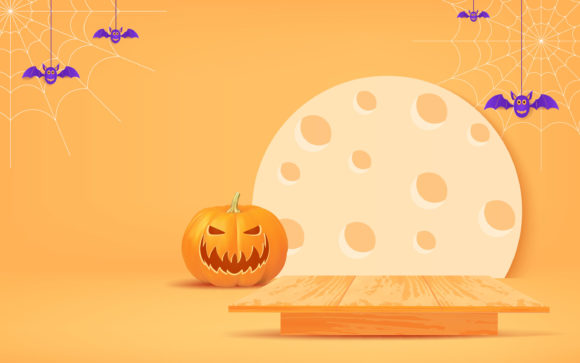
At its core, 3D Halloween background design refers to digital or physical backgrounds that simulate depth, volume, and realistic lighting to create an immersive Halloween setting. Unlike traditional two-dimensional images, these backgrounds use layers, shadows, perspective, and sometimes animated elements to give the illusion of a real space. Think of a haunted hallway where the walls recede into darkness, or a moonlit graveyard where tombstones cast long shadows across the ground. That sense of space and realism is what makes 3D backgrounds stand out.
The key characteristics include:
- Depth and layering – Foreground, midground, and background elements create a sense of distance.
- Dynamic lighting – Shadows, highlights, and glow effects mimic real-world light sources, such as candlelight or moonlight.
- Textured surfaces – Wood grain, stone, fog, and fabric details add tactile realism.
- Atmospheric effects – Mist, fog, glowing eyes, or flickering lights enhance the mood.
- Interactive or animated possibilities – Some 3D backgrounds can respond to user actions or include subtle motion like drifting fog or swaying branches.
The appeal lies in its ability to transform any space or screen into a believable Halloween environment. Whether you want a spooky but friendly vibe or something genuinely unsettling, 3D backgrounds give you control over the mood without needing to build a physical set.
Why People Turn to 3D Halloween Backgrounds
There are several practical reasons why someone might explore 3D Halloween background design. For content creators and marketers, the goal is often to grab attention quickly. A flat image might get a glance, but a 3D scene invites exploration. Bloggers and small business owners use these backgrounds to make their Halloween promotions feel more polished and professional. Educators and hobbyists might use them to create immersive storytelling environments for virtual classrooms or personal projects.
The problems that 3D backgrounds help solve include:
- Limited physical space – Not everyone can decorate a large room or storefront. A digital 3D background provides instant atmosphere without clutter.
- Budget constraints – Building a real haunted house or elaborate display can be expensive. A well-designed 3D background costs a fraction of that.
- Time pressure – Setting up physical decorations takes hours or days. Downloading or designing a 3D background takes minutes.
- Audience engagement – In digital marketing, flat visuals often get overlooked. A 3D background can increase dwell time and click-through rates.
For freelancers and entrepreneurs, having access to high-quality 3D backgrounds means they can offer visually compelling services without needing a large budget or studio space. It levels the playing field, allowing smaller players to compete with bigger brands during the Halloween season.
Where and How to Use 3D Halloween Backgrounds
The versatility of 3D Halloween background design means it fits into many contexts, both personal and professional. Here are realistic use cases across different areas.
Digital Content and Social Media
If you run a social media account, blog, or YouTube channel, a 3D Halloween background can serve as a backdrop for videos, livestreams, or photo shoots. Instead of filming in front of a plain wall, you can place yourself inside a haunted library or a fog-covered cemetery. This adds visual interest and helps your content stand out during the Halloween season. Many creators use green screens combined with 3D backgrounds to transport themselves into a spooky world without leaving their home office.
Website and E-commerce Design
For small business owners and marketers, updating a website with seasonal visuals is a common practice. A 3D Halloween background can be used as a hero image, a landing page backdrop, or even a subtle overlay on product pages. It creates an immediate seasonal connection and can encourage visitors to browse longer. For example, an online costume shop could use a 3D haunted mansion background behind featured products, making the shopping experience more engaging.
Virtual Events and Online Classrooms
Educators and event hosts often look for ways to make virtual gatherings feel special. A 3D Halloween background transforms a standard Zoom or Teams meeting into something festive. Whether you are hosting a virtual Halloween party, a spooky story session, or a themed lesson, the background sets the tone without requiring physical decorations. Some 3D backgrounds even include subtle animations, like drifting fog or twinkling lights, which add a layer of immersion without being distracting.
Print and Physical Decor
While 3D backgrounds are often digital, they can also be printed. High-resolution 3D scenes can be used for party backdrops, photo booth displays, window decorations, or even large-format banners. The depth and realism of a 3D design make printed versions look more dynamic than standard flat posters. For example, a printed 3D graveyard scene with layered tombstones and a dramatic sky can turn a simple wall into a photo-worthy spot at a Halloween party.
Graphic Design and Marketing Materials
Freelancers and graphic designers frequently incorporate 3D backgrounds into flyers, email headers, social media graphics, and advertisements. The three-dimensional quality helps the design feel more premium and less generic. A 3D Halloween background can be used as a texture, a frame, or a full-scene backdrop for product mockups. It gives designers a quick way to add seasonal flavor without building everything from scratch.
Practical Tips for Working with 3D Halloween Backgrounds
Whether you are a beginner or a seasoned creator, there are a few things to consider when choosing or designing a 3D Halloween background design.
- Resolution matters – For digital use, ensure the background is large enough to fit your screen or canvas without pixelation. For print, aim for at least 300 DPI.
- Lighting consistency – If you plan to overlay text, products, or people onto the background, match the lighting direction and color temperature so everything looks natural together.
- File format and compression – Some 3D backgrounds come as layered files (PSD, TIFF) or rendered images (PNG, JPEG). Animated backgrounds might be GIF, MP4, or HTML5. Choose based on your platform's requirements.
- Licensing and attribution – If you download backgrounds from online marketplaces, check the license. Some are free for personal use but require attribution or a license for commercial projects.
- Performance impact – Animated or interactive 3D backgrounds can slow down websites or apps if not optimized. Consider using static renders or lightweight formats for web use.
- Audience appropriateness – Halloween spans from cute and spooky to genuinely frightening. Choose a background that fits your audience and brand tone. A children's event might call for friendly ghosts and glowing pumpkins, while a horror-themed promotion could use darker, more intense imagery.
Getting Started with 3D Halloween Background Design
If you are new to 3D Halloween background design, you do not need to master complex 3D software right away. Many resources are available for different skill levels:
- Pre-made assets – Websites like Envato Elements, Creative Market, and even free platforms like Pixabay offer 3D Halloween backgrounds ready to download and use.
- Basic 3D software – Tools like Blender (free), SketchUp, or even Canva’s 3D features allow you to customize existing scenes or create simple ones from scratch.
- Online generators – Some platforms let you customize 3D scenes by adjusting colors, elements, and lighting without needing design skills.
- Learning resources – YouTube tutorials and online courses on 3D design can help you build custom backgrounds tailored to your specific needs.
For beginners, the fastest path is to start with a high-quality pre-made background and customize it slightly to fit your project. As you grow more comfortable, experimenting with lighting adjustments, element placement, and even simple animations can take your designs further.
Why 3D Halloween Backgrounds Work So Well
The human eye is naturally drawn to depth and movement. A 3D background taps into that instinct. It creates a sense of space that makes the viewer feel like they are looking into a real place, not just at a picture. This psychological effect is especially powerful during Halloween, when atmosphere and emotion are central to the experience. Whether you are aiming for a subtle seasonal touch or a fully immersive horror scene, 3D depth helps deliver that feeling without needing a huge production.
For anyone involved in content creation, marketing, education, or event planning, 3D Halloween background design offers a practical and visually rewarding way to celebrate the season. It saves time, reduces costs, and opens up creative possibilities that flat designs simply cannot match. By understanding the basics and choosing the right approach for your context, you can create Halloween visuals that truly stand out.