3D iPad Mockup Designs for Modern Creators
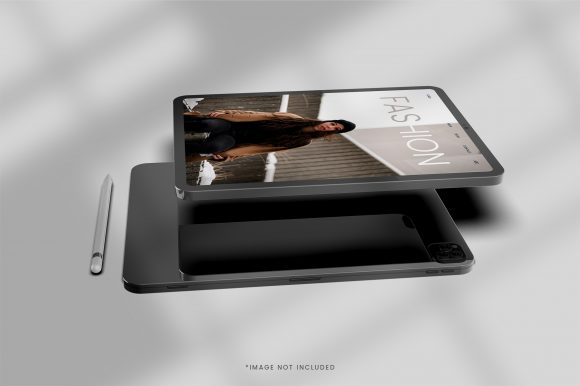
Whether you are presenting a new app, showcasing a portfolio, or designing marketing materials for a client, the way you display digital content can make a big difference. A flat screenshot often fails to convey the real experience of using a product. This is where a 3D iPad mockup comes into play. At its core, a 3D tablet screen design is a realistic, often customizable, representation of an iPad displaying your content in a lifelike environment. Instead of a simple rectangle, the screen is shown with depth, shadows, angles, and sometimes even interactive lighting. The result is a visually compelling image that feels more professional and engaging.
The purpose of a 3D iPad mockup is to bridge the gap between a static design and the real-world experience of holding and using a tablet. It helps viewers imagine how your work would actually look on a device. For anyone who creates digital products—from graphic designers and app developers to bloggers and business owners—this kind of presentation adds instant credibility. It signals that you care about the details and understand how your audience interacts with technology.
Why a Realistic 3D Tablet Screen Matters
Have you ever scrolled through a website or an online store and felt that something was missing? Many digital portfolios or product pages rely on plain screenshots. While these show the content, they do not create a visual story. A 3D iPad mockup transforms a simple image into a narrative. It places the screen in a context that feels familiar, such as on a desk, in someone's hands, or within a modern workspace. This context helps viewers connect emotionally with your work.
The appeal of a 3D tablet screen design lies in its ability to make your content look polished without requiring expensive photography. You do not need a real iPad, a studio, or professional lighting equipment. Instead, you use a digital file that simulates those elements. This makes high-quality presentations accessible to everyone, whether you are a freelancer working from home or a marketing team in a large company. Moreover, the best mockups allow you to easily swap your own screen designs into the template, so you can update your portfolio or social media posts in minutes.
Solving Common Problems for Creators and Businesses
Many people struggle with making their digital work stand out. A common pain point is that flat images fail to capture attention in crowded feeds or websites. Another challenge is the time and cost associated with professional product photography. A high-quality iPad mockup addresses both issues. It helps you:
- Showcase apps or websites in a way that highlights the user interface and overall experience.
- Build trust by presenting your work in a realistic setting, which suggests reliability and attention to detail.
- Save time by using reusable templates that can be updated quickly for different projects or clients.
- Maintain brand consistency by applying the same mockup style across various platforms, from your website to social media ads.
For entrepreneurs and small business owners, a polished presentation can be the difference between a potential customer scrolling past or stopping to learn more. For educators and hobbyists, it offers a simple way to create teaching materials or share personal projects with pride.
Where and How to Use a 3D iPad Mockup
The versatility of a 3D tablet screen design means it fits into many different contexts. You are not limited to just one type of project. The following are practical, beginner-friendly scenarios where a 3D iPad mockup can elevate your work.
App Development and Software Demonstrations
If you are developing an app, you need to show potential users or investors how it works. A series of 3D iPad mockups can illustrate the main screens, navigation flow, and key features. For example, you might place the home screen on one tablet, the login page on another, and a settings panel on a third. By arranging these mockups in a row or a grid, you create a mini-walkthrough that feels more dynamic than a slide deck. This approach works equally well for software companies demonstrating a new platform or for a freelance developer pitching a concept to a client.
Online Portfolios and Personal Branding
Designers, illustrators, and photographers often use mockups to display their best work. Instead of listing a gallery of flat images, you can show each piece on an iPad screen. This gives the viewer a sense of scale and context. For instance, a digital painter might present their artwork on a tablet against a cozy background, such as a wooden table with a coffee cup. This not only shows the art itself but also conveys a lifestyle and aesthetic that aligns with the creator's brand. Bloggers and content creators can use a 3D iPad mockup as a featured image for a post or as part of a media kit to attract sponsors.
Marketing Materials and Social Media Campaigns
Marketers know that visuals drive engagement. A 3D mockup can be used in email newsletters, landing pages, or paid ads to promote a new service or digital product. For example, if you are launching an online course, you could create a promotional image that shows the course dashboard on an iPad screen. This instantly communicates the value of what you are offering. Social media platforms like Instagram and Pinterest respond well to visually striking images, and a well-designed mockup can stop users mid-scroll. Even a simple before-and-after comparison using two iPads can be more compelling than a side-by-side screenshot.
Educational Content and Tutorials
Educators and trainers often need to show software interfaces or digital worksheets. A 3D tablet screen design can make tutorials feel more relatable and less abstract. For instance, a teacher explaining a math app might use a mockup to demonstrate how students interact with the exercises. A trainer teaching web design could create step-by-step visuals that show the process on a realistic device. This approach helps learners connect the digital content to a tangible object, which can improve understanding and retention.
Important Considerations Before Choosing a Mockup
While 3D iPad mockups are powerful tools, not all templates are created equal. To get the most out of your investment, it helps to understand a few key factors. Thinking about these details early on can save you time and ensure your final presentation looks professional.
- Resolution and file quality. Look for mockups that support high-resolution output. A blurry or pixelated image will damage your credibility, especially if the content is meant for print or large displays. Most quality templates offer at least 300 dpi and scalable vector elements.
- Ease of customization. Some mockups use smart objects in software like Photoshop, which allow you to paste your design into a dedicated layer. Others are designed for online tools or even require no software at all. Choose a format that matches your technical comfort level. If you are a beginner, stick with templates that have clear instructions and simple editing steps.
- Angle and perspective variety. A single mockup angle can work for one project, but if you plan to create a series of images, consider a set that offers multiple perspectives, such as front-facing, tilted, or held in hand. This variety adds visual interest and flexibility to your content.
- Lighting and background options. The best 3D mockups mimic realistic lighting conditions. Some come with adjustable shadows or the ability to change the background color. A neutral or subtle background is often safest because it lets your screen content remain the focus. However, having options for different environments, such as a desk or an outdoor setting, can be useful for specific campaigns.
- License and usage rights. Always check the license agreement, especially if you are using the mockup for commercial projects or client work. Some free templates restrict usage to personal projects, while premium ones grant broader permissions. Respecting these terms protects you legally and supports the creators who make these resources available.
Getting Started Without Overthinking
If you are new to using 3D tablet screen designs, the first step is to find a reliable source. Many marketplaces offer both free and paid mockups. Start with one or two high-quality, free options to practice the editing process. The goal is not to become a technical expert but to develop an eye for what looks natural and appealing. Over time, you will learn which angles, lighting styles, and backgrounds best suit your brand or project.
One common pitfall is trying to make the mockup too busy. Remember that the iPad screen itself is the star. The surroundings should support it without overwhelming the viewer. A clean, simple desk scene with a notebook and pen can feel professional, while a chaotic background with too many objects can distract from your core message. Similarly, avoid using mockups that have exaggerated reflections or unnatural shadows, as these can make the image feel artificial rather than premium.
A Practical Example to Illustrate the Value
Imagine you are a freelance graphic designer who has just completed a brand identity package for a local coffee shop. You want to present the logo, color palette, and menu design to the client. Instead of sending a PDF of flat images, you create a single image that shows the menu displayed on an iPad, held by someone sitting at a café table. The background includes a coffee cup and a few beans. This one image tells a story. It shows how the design will look in a real environment, which can make the client feel more confident in your work. That small extra effort can strengthen your professional relationship and potentially lead to more referrals.
In another scenario, a blogger writing about productivity tools creates a roundup post featuring five different apps. For each app, they use a 3D iPad mockup with a matching color scheme. The consistent presentation style makes the blog post feel cohesive and well-edited. Readers are more likely to trust the recommendations because the content looks carefully curated. This approach takes only a few minutes per mockup but adds significant perceived value.
Final Observations on 3D iPad Mockup Design
A 3D tablet screen design is not just a visual trend. It is a practical solution for anyone who wants to present digital content in a compelling, professional manner. Whether you are a seasoned marketer or someone who simply wants to share a personal project, using a realistic mockup can improve how your audience perceives your work. The key is to choose high-quality templates that match your skill level, customize them thoughtfully, and use them consistently across your platforms. By doing so, you communicate that you value quality and understand the importance of context in visual communication.
As you explore different styles and tools, remember that the best mockups are the ones that make your content shine without drawing attention to themselves. The goal is not to impress with the mockup itself but to let your actual work take center stage in the most flattering light possible. With a little practice and attention to detail, a 3D iPad mockup can become a valuable element in your creative toolkit.